
We know release notes can sometimes feel like a checklist but not this one. This time, we’ve packed in features that directly reflect what you’ve been asking for, whether it’s deeper multicast visibility, faster bulk workflows, smarter alerting, or more dynamic monitoring.
If you’ve ever thought “I wish I could just see this one thing more clearly”, chances are, it’s in here.
This update is all about speeding you up, reducing noise, and giving you sharper control over the traffic and entities that matter most.
Let’s jump into what’s new and why we’re excited for you to try it.
Multicast GraphX – Multicast Traffic, Made Visible
Multicast traffic has long been one of the hardest things to visualize and troubleshoot, especially in high-performance environments like financial networks and data feeds.
That’s why we’ve rolled out Multicast GraphX in this release.
This new feature gives you an interactive view of multicast group activity. You can now see who’s sending, who’s listening, and how much traffic is flowing, all in one clean visual graph.
Paired with the ICMP Multicast App, GraphX brings together:
-
- Sender ↔ Receiver group relationships
- ICMP join/leave messages
- Live stats like bitrate, flow counts, and traffic volume
- Drill-downs into Trisul dashboards for deeper context
It’s powered by D3.js and built for action, not just observation. If you’ve been blind to multicast patterns till now, this one’s for you.
Bulk IPDR Queries – Now with Multiple IPs per Row
Running IPDR queries just got a serious speed boost.
In environments where analysts frequently need to query large volumes of subscriber data, the old one-IP-per-line format wasn’t cutting it.

With this release, Trisul now supports importing multiple IPs per row when submitting IPDR queries. That means:
-
- You can paste in comma-separated IPs in a single row
- Perform faster, consolidated lookups without splitting into multiple files
- Get instant visibility into activity across multiple subscribers in one go
Perfect for large ISPs, LEA workflows, or any bulk investigation scenario where time matters and manual work should be minimal.
Just drop your list into the IPDR search whether it’s 192.168.1.1, 192.168.1.2, 192.168.1.3 on one line and go.
Efficiency, delivered.
Smarter ICMP Flood Tracking – Know the Attacker and the Victim
ICMP floods can sneak through when you’re not watching closely. Now, Trisul makes that visibility automatic.
With this release, you can track ICMP flood activity per host and immediately identify both the source (attacker IP) and destination (target IP) once the traffic crosses a threshold.
You get:
-
- Real-time detection when ICMP traffic exceeds defined kbps or Mbps thresholds
- Clear visibility into who’s sending and who’s being hit
- Easy pivoting from alerts into traffic flows and host behavior
This is especially useful in DDoS detection, scanner suppression, or when someone’s hammering your infrastructure with pings.
It’s all available under Alerts → ICMP Flood, with built-in stats and charts.
Because floods shouldn’t fly under the radar.
Custom Key Monitors – Now with Regex & Auto-Discovery
Custom Key Monitors have always been a go-to feature for teams needing focused, real-time visibility into specific entities, be it a handful of hosts, interfaces, or apps you care about, even when they’re buried under thousands of other.
With this release, we’ve added two powerful capabilities to make Custom Key Monitors evern more dyanamic:
Regex-Based Key Matching
Now you can define a regular expression (RE2 format) to automatically match keys that follow a naming pattern. No need to maintain a static list, just set the pattern once, and let Trisul track all matching keys in real time.
Perfect for high-scale environments where new keys appear frequently, but naming conventions stay consistent.
Auto-Discover Keys
Along with regex support, we’ve introduced Auto Discover so Trisul will continuously scan and pull in any new keys that match your defined pattern. It’s set-it-and-forget-it monitoring, ideal for dynamic networks.
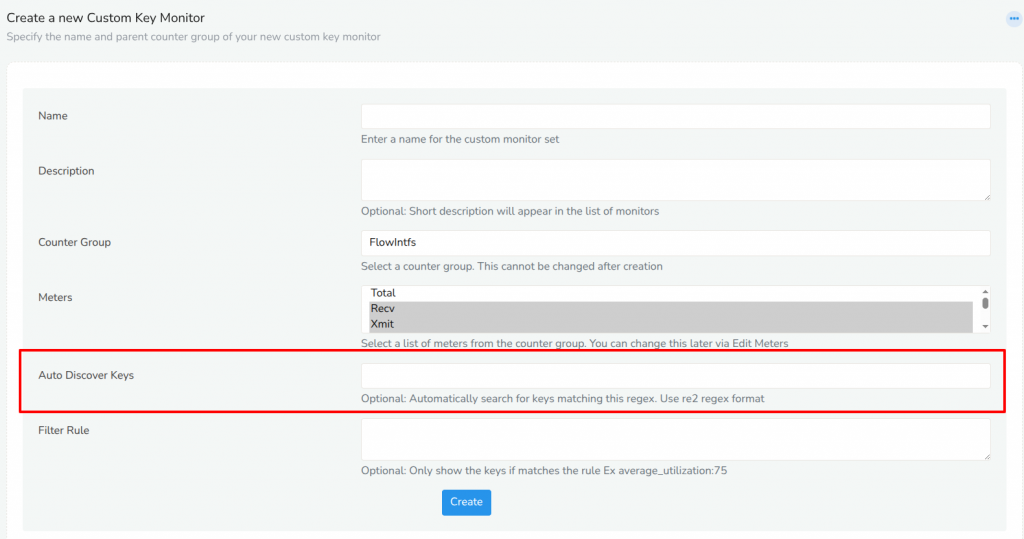
Whether you’re tracking build servers, uplink interfaces, VSAT links, or custom apps, now you can do it faster, and without missing a beat.
Find it under Customize → Show all → Custom Key Monitors.
Utilization-Based Alerts & Key Filtering – See What Really Matters
In high-throughput environments, it’s not enough to monitor everything. You need to know when something needs attention.
With this release, Trisul adds smarter filtering and alerting capabilities for interface and key utilization thresholds.
Get Alerts When Utilization Crosses a Threshold
You can now configure alerts when interface utilization exceeds a specific percentage say 75%,85% or any custom value. Whether its a backbone uplink or a critical VSAT link you’ll know exactly when its starts pushing limits.
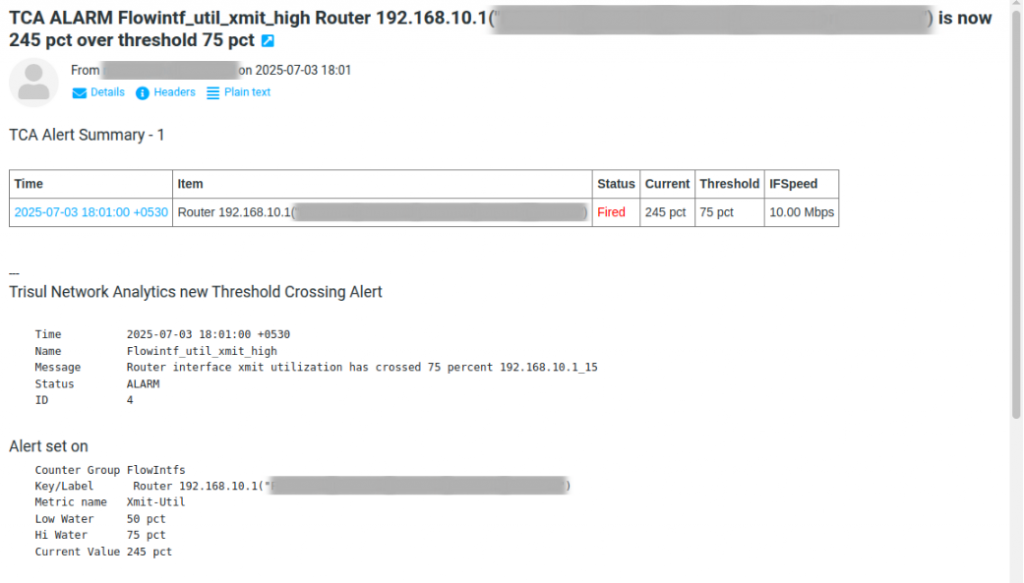
Filter Keys by Utilization
In Custom Key Monitors, you can now apply metric filters like average_utilization:75 to automatically include only keys that have crossed a certain utilization threshold.
This means:
-
- No more digging through long lists to find high-usage links
- Easily track only the “hot” interfaces or circuits
- Combine with regex for ultra-targeted, dynamic monitoring
It’s the easiest way to surface what matters, and ignore the noise.
Flexible IPDR Formats – View & Download in the Format You Need
We know IPDR isn’t one-size-fits-all. Different teams, regions, and regulatory frameworks require different data layouts.
With this release, you can now choose the IPDR format you want to view or download, right from the interface.
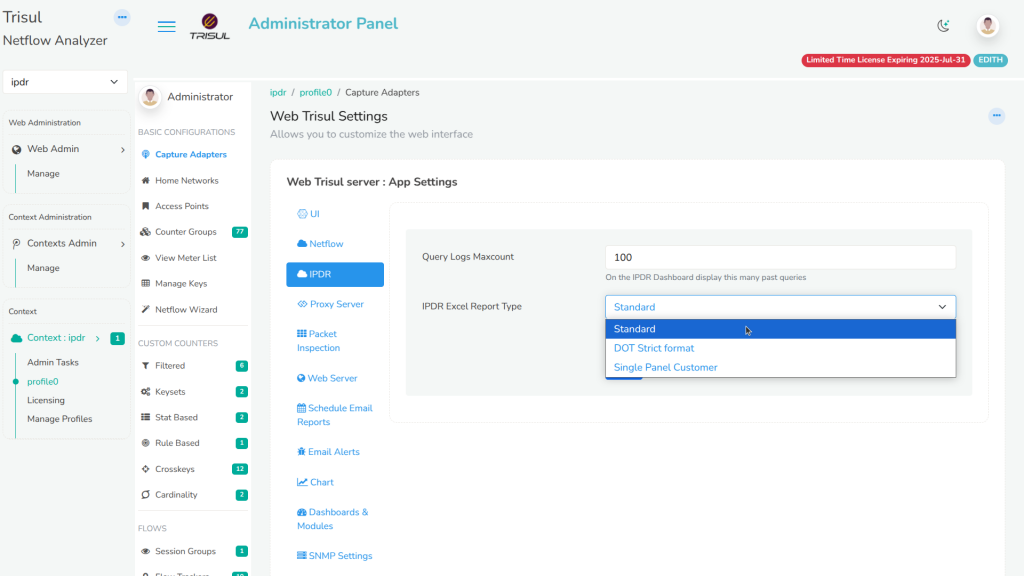
Supported formats:
-
- Standard Format – the default, full-featured view
- DoT Strict Format – for LEA or regulatory workflows requiring strict column layouts
- Single Panel Customer Format – compact view tailored for customer-centric panels or reports
Just pick the format you need, and Trisul adjusts instantly, whether you’re investigating, exporting, or sharing.
No conversions, no manual reformatting. Just clean, ready-to-use IPDR exports, built for your workflow.